Cursor Rules: What They Are, Why They Matter, and How Teams Use Them with AI Agents
Learn what cursor rules are, why they matter for AI-assisted coding, and how teams use them to keep humans and agents aligned in Nonilion.
N
Nonilion Editorial
Jun 28, 2026 · 10 min read
Cursor Rules: What They Are, Why They Matter, and How Teams Use Them with AI Agents
Cursor rules can be a useful way to give AI-assisted coding more consistent direction. Based on the sources reviewed, they are described as instructions in Cursor that can help shape how the editor behaves across projects, teams, and individual users. In the context of an AI office, shared instructions can help humans and AI agents stay aligned.
At a high level, the idea is straightforward: instead of repeating the same guidance in every prompt, teams can define rules once and let them guide the work. That can matter whether you are fixing bugs, building new features, or coordinating async work in a virtual workspace like Nonilion, where humans and AI agents may benefit from shared conventions.
What Are Cursor Rules?
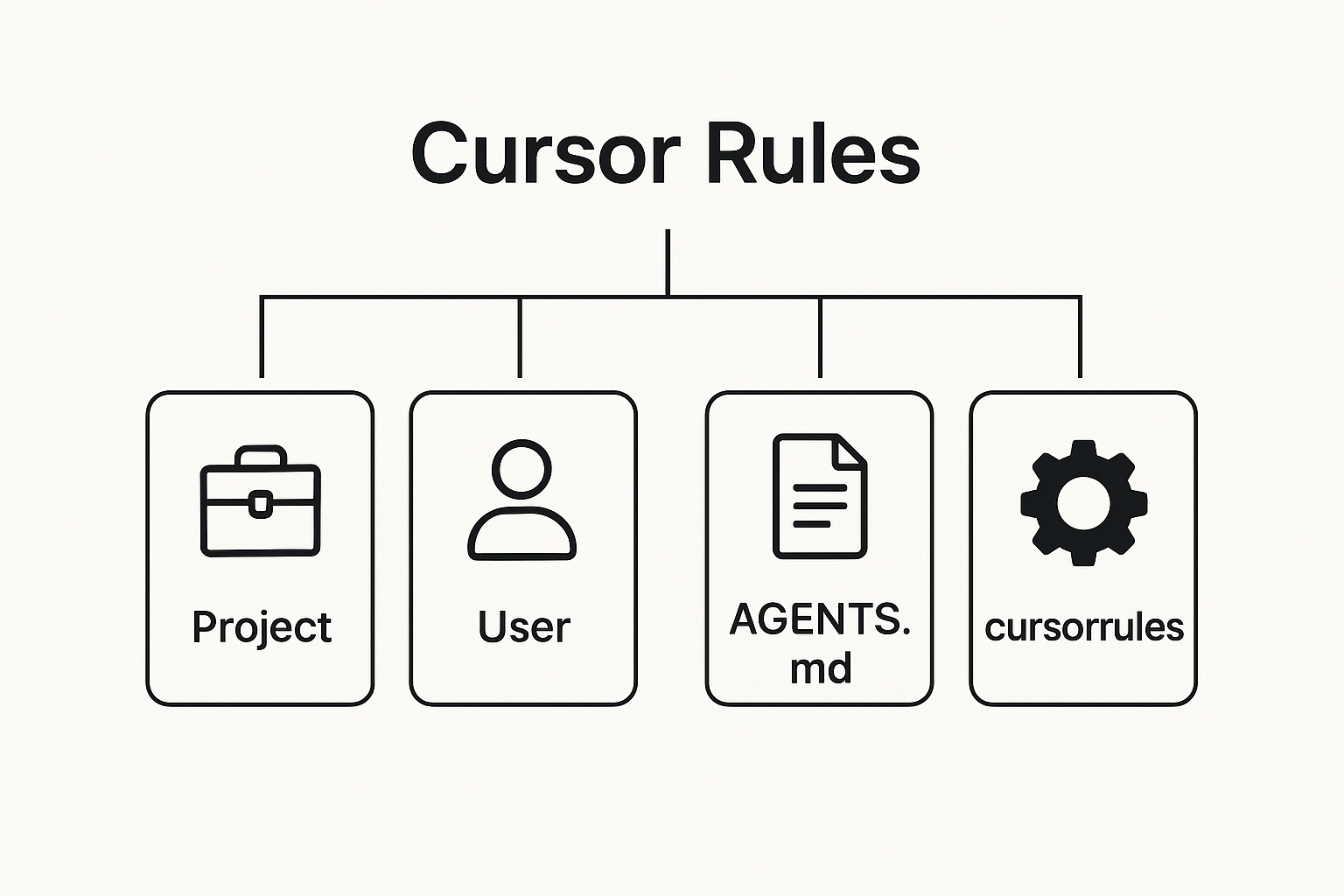
Cursor Docs describes rules as persistent instructions, and the sources point to a few common forms: Project Rules, Team Rules, User Rules, and AGENTS.md. In practice, cursor-rules are a way to guide how Cursor behaves when working in a codebase.
A practical definition, based on the sources, is this: cursor rules are reusable guidance for AI-assisted coding that describe conventions, workflows, and guardrails. They are not just one-off prompts.
FAQs
How does Nonilion help with cursor-rules?
For cursor-rules, Nonilion can help teams coordinate planning, meetings, and follow-ups in one collaborative workflow. It supports clearer decision tracking, async collaboration, and practical execution across distributed teams.
What are Cursor rules in practical terms?
Cursor rules are persistent instructions that guide how Cursor behaves across tasks, projects, or users. They’re meant to capture reusable conventions, workflows, and guardrails so you don’t have to repeat the same guidance in every prompt.
How are Project Rules, Team Rules, User Rules, and AGENTS.md different?
Project Rules apply to one codebase, Team Rules are shared across a group, User Rules reflect individual preferences, and AGENTS.md is another project-level place to give instructions to AI agents. In practice, they can work together as layered context.
What should Cursor rules include, and what should they avoid?
Good rules should describe how to build: coding conventions, workflow expectations, and guardrails for consistency. They should avoid turning into feature specs, because that makes them less reusable and more likely to conflict with the actual task prompt.
How can a team keep Cursor rules useful over time?
Keep them short, focused, and tied to stable team habits. Review them regularly, remove outdated guidance, and assign ownership so the rules stay aligned with how the team actually works.
How does Nonilion help teams use Cursor rules with AI agents?
The GitHub resource on awesome-cursorrules also frames Cursor Project Rules as project-specific guidance and reusable coding standards. That makes them part of the working context for the AI agent.
Why Cursor Rules Matter Now
The sources suggest that rules can be more useful when they are shared rather than kept only as personal preferences.
That matters because AI coding tools may work more consistently when they know the team’s patterns. A simple rule set can help the AI produce more consistent output when fixing bugs or building new work, as the Medium example suggests. The Reddit discussion adds an important principle: rules should describe how to build, not what to build. In other words, they should capture patterns and conventions rather than turn into feature specifications.
This is relevant in AI offices as well. In a place like Nonilion, where meeting follow-ups, async execution, and workflow automation may involve AI agents, shared instructions can reduce repetition. Instead of each person teaching the agent the same habits again and again, the workspace can carry those instructions forward.
How Cursor Rules Work: Project Rules, Team Rules, User Rules, and AGENTS.md
The Cursor Docs source explicitly mentions Project, Team, and User Rules, plus AGENTS.md. Based on that structure, the practical distinction is straightforward:
Project Rules: guidance tied to a specific codebase or repo
Team Rules: shared conventions used across a group
User Rules: personal preferences for an individual workflow
AGENTS.md: another place to define instructions for AI agents in the project context
The sources do not provide a full technical specification for each, but they do show the core idea: different layers of instructions can coexist. That layered setup can be useful when multiple AI agents and humans are working in the same environment.
What Good Cursor Rules Actually Describe
One of the clearest takeaways from the sources is what cursor rules should not become. They should not be a feature spec. They should describe how to build.
The Reddit quote is especially direct: “Your rules should describe how to build, not what to build.” That distinction is important. If rules become a list of product decisions, they stop helping the AI agent operate consistently and start competing with the actual task definition.
The GitHub collection of awesome-cursorrules also suggests that teams use rules across many domains, from frontend and backend to testing, security, documentation, and deployment. That breadth implies rules are most useful when they encode stable ways of working.
How to Write Cursor Rules That AI Agents Can Follow Reliably
The sources point toward a few practical writing principles.
First, keep rules simple. The Medium post explicitly highlights “simple rules” for better results from Cursor AI. Second, write rules that are reusable across tasks. Third, make them about patterns and conventions rather than one-off instructions.
A reliable rule is one that an AI agent can apply repeatedly without needing extra explanation. That means it should be clear, stable, and grounded in the team’s actual workflow.
A useful test is this: if a rule only makes sense for one feature, it probably belongs in the task prompt, not in persistent rules.
When to Use Cursor Rules vs. AGENTS.md vs. Personal Preferences
The sources do not give a strict decision tree, but they do suggest a practical division of labor.
Use cursor-rules when the guidance should persist and shape behavior across repeated work. Use AGENTS.md when you want project-level instructions available to AI agents in the repo context. Use personal preferences when the guidance only matters to one person’s workflow.
This matters in collaborative environments because not every instruction should be shared at the same level. In a Nonilion-style AI office, for example, a team might want shared rules for how AI agents summarize meetings or format follow-ups, while individual users keep their own preferences for how they review output.
Common Mistakes: Rule Bloat, Feature Specs, Conflicting Instructions, and Stale Context
The sources imply several common failure modes even if they do not list them as a formal taxonomy.
Rule bloat: too many instructions make the system harder to follow
Feature specs inside rules: rules drift away from conventions and into product planning
Conflicting instructions: different layers of rules can work against each other
Stale context: rules can become outdated if they are not maintained
The practical warning is clear: rules should stay usable. If they become too long or too specific, they stop helping the AI agent and start adding noise.
How Teams Maintain Cursor Rules Over Time
The sources do not provide a formal maintenance framework, but they do point to the need for ongoing curation. Since Cursor rules are meant to persist, they need periodic review.
A sensible maintenance approach, based on the sources’ emphasis on reusable standards, would include:
assigning ownership for shared rules
updating rules as conventions evolve
pruning instructions that no longer help
keeping the set focused on stable workflows
That kind of maintenance is especially important in team settings where AI agents are expected to work across multiple tasks. Without upkeep, the rules can drift away from the way the team actually works.
This is where the topic connects directly to AI offices. In a virtual workspace like this platform, shared instructions can function as a collaboration layer between humans and AI agents. Instead of treating each interaction as isolated, the office can preserve the team’s working logic in a reusable form.
That matters for coordination tasks such as meeting follow-ups, async execution, and workflow automation. If the AI agents know the team’s preferred conventions, they can produce outputs that are easier for humans to review and act on. The result is less repetition and more consistent collaboration.
In that sense, cursor-rules are not just an editor feature. They can also be part of how shared context is maintained inside an AI office.
How Cursor Rules Support Human + AI Coordination in a Virtual Workspace
Cursor rules can help humans and AI agents coordinate by reducing ambiguity. When the team’s standards are written down, the agent can work with fewer reminders and the human can spend less time correcting format or process issues.
That is valuable in a virtual workspace because collaboration often happens asynchronously. A well-structured rule set can help keep the work aligned even when people are not in the same room or even online at the same time.
For this platform-style collaboration, the practical benefit is straightforward: shared instructions can make it easier for AI agents to act like part of the team rather than a separate tool.
A Practical Cursor Rules Template for Teams Using AI Agents
Based on the sources, a team template should stay simple and focused on how the team works.
markdown
Cursor Rules
Coding Conventions
Follow the team’s established patterns.
Keep implementation consistent with the existing codebase.
Workflow Expectations
Use the project’s normal approach for changes and fixes.
Prefer reusable solutions over one-off exceptions.
Guardrails
Describe how to build, not what to build.
Avoid adding feature specifications into persistent rules.
Keep instructions clear and concise.
Maintenance
Review rules regularly.
Remove outdated guidance.
Keep shared instructions aligned with current team practice.
This template stays within the boundaries suggested by the sources: it emphasizes conventions, workflows, and guardrails rather than detailed product decisions.
Where Cursor Rules Fit in the Future of Work
The sources show cursor-rules as a feature of an AI-powered code editor, but the broader implication is that stable instructions can help coordinate AI work across tools and tasks.
That is why cursor-rules matter beyond coding alone. They point toward a future where shared instructions help coordinate humans and AI agents across tools, tasks, and virtual workspaces. In that future, this platform’s role is not just as a place to work, but as an example of how an AI office can use shared context to support repeatable collaboration.
Conclusion: Turning Cursor Rules Into a Repeatable Team Advantage
Cursor rules matter because they turn individual preferences into shared, reusable guidance. The sources consistently point to the same core idea: keep rules persistent, keep them simple, and keep them focused on how the team builds.
For teams using AI agents, that can create an advantage. It reduces repetition, improves consistency, and makes collaboration easier across projects. In a virtual office like this platform, those same rules can help humans and AI agents work from the same playbook, making async coordination and workflow automation more reliable.
Why This Trend Matters for Nonilion
This trend matters to Nonilion because it points to a bigger change: teams are moving from simple calls toward persistent, AI-supported collaboration spaces. Nonilion can bridge live presence, meeting context, avatars, and follow-up work so the trend becomes a usable workflow instead of a headline.
Shareable Extracts
The trend is not just "Cursor Rules: What They Are, Why They Matter, and How Teams Use Them with AI Agents" - it is a signal that team coordination is becoming the next competitive edge.
Hot take: the teams that win from this shift will not be the ones with more meetings; they will be the ones with clearer shared context after every meeting.
If cursor rules: what they are, why they matter, and how teams use them with ai agents keeps moving this fast, remote teams need a workspace where conversation, presence, and follow-up stay connected.
Cursor Rules: What They Are, Why They Matter, and How Teams Use Them with AI Agents Cursor rules can be a useful way to give AI-assisted coding more consistent direction.
Based on the sources reviewed, they are described as instructions in Cursor that can help shape how the editor behaves across projects, teams, and individual users.
Social Hooks
Everyone is talking about Cursor Rules: What They Are, Why They Matter, and How Teams Use Them with AI Agents. The overlooked part is what happens to team workflows after the headline fades.
The uncomfortable question behind Cursor Rules: What They Are, Why They Matter, and How Teams Use Them with AI Agents: are teams adapting their collaboration systems fast enough?
This is not a meeting trend. It is a coordination trend, and products like Nonilion sit right in the middle of that shift.
This article on cursor-rules was generated by the Nonilion AI blog workflow using web research inputs and AI-assisted synthesis.
Nonilion helps by giving teams a shared workspace for async collaboration, where conventions can be carried forward instead of repeated in every interaction. That makes it easier to keep human and AI agent work aligned on things like meeting follow-ups, task handoffs, and workflow automation.